


Data Engineering on GCP: Building the Production Storage & Access Layer (Hands-On Lab)
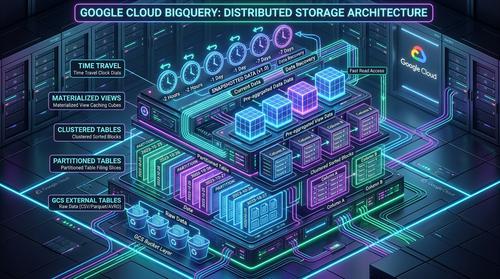
In Part 1 of this series, we mapped the architectural evolution of Offvia, a regional flight booking engine that rapidly outgrew its transactional database. We analyzed why modern cloud analytics requires distinct storage primitives: from raw landing in Cloud Storage to columnar pruning in BigQuery, automatic aggregation in Materialized Views, and cryptographic isolation in Authorized Views.
Now it is time to build it.
Architecture diagrams are useful, but they hide the operational details that usually matter most at 3:00 AM in production. The real engineering work starts when you have to write the DDL, choose partition boundaries, handle late-arriving events across timezone offsets, recover from an accidental production UPDATE, or expose useful metrics to auditors without leaking a single byte of passenger data.
In this lab, we will build Offvia’s storage and access layer from scratch using the Google Cloud CLI (gcloud), the bq CLI, BigQuery SQL, and Python. The goal is not just to create resources, but to understand why each design choice matters and what happens when things go sideways.
Lab Environment & Prerequisites: All commands in this guide use standard Google Cloud tools: gcloud CLI (v480.0+), bq CLI, Python 3.10+, and standard BigQuery SQL. Ensure you have roles/bigquery.admin and roles/storage.admin IAM roles assigned. Replace offvia-prod-data with your target project ID. Note that materialized view rewrites and enterprise features assume either BigQuery Enterprise/Enterprise Plus editions or standard On-Demand pricing.
require_partition_filter enforcement.5 Common GCP Data Engineering Misconceptions
Before we run anything, let us clear up five common misconceptions that frequently lead to unexpected query costs, poor performance, or audit failures.
The Myth: "If we store our booking data in Apache Parquet on Cloud Storage, external table queries will perform just like native BigQuery tables."
The Reality: External queries must make remote HTTP calls to Cloud Storage, list object metadata, and read files over the network without native Capacitor compression, block-level min/max dictionary pruning, or Colossus direct NVMe bus throughput.
The Myth: "Just cluster by booking date and carrier code; clustering is more flexible than strict partitioning."
The Reality: Partitioning guarantees cost pruning before query execution begins and allows enforcement via require_partition_filter = true. Clustering optimizes block layout inside partitions. If you omit partitioning, a runaway query can scan your entire multi-year historical dataset.
The Myth: "Create materialized views on all heavy dashboard queries to make everything instant."
The Reality: If a query contains non-deterministic functions (like CURRENT_TIMESTAMP()), window functions without aggregations, or high-cardinality group-by columns, BigQuery cannot transparently rewrite the query and the view adds maintenance slot overhead without any speed benefit.
The Myth: "We don't need disaster recovery snapshots because BigQuery has built-in 7-day Time Travel."
The Reality: Time Travel only provides a sliding 7-day window (configurable from 2 to 7 days). If a silent data corruption or corrupting DML logic bug goes unnoticed for 8 days, Time Travel cannot help you. True point-in-time baseline protection requires explicit Table Snapshots.
The Myth: "Granting a user roles/bigquery.dataViewer on a view automatically lets them query the underlying table."
The Reality: If you don't explicitly authorize the view inside the source dataset configuration, BigQuery checks permissions on the underlying table and immediately returns 403 Access Denied. Furthermore, the external user still needs roles/bigquery.jobUser on their own project to allocate query slots.
The End-to-End Pipeline
Before running commands, let us review the pipeline topology we are building:
  [Producers: Booking Web App / Kiosk Sync / Offline Flight Batch]
                              │
                              ▼
        ┌──────────────────────────────────────────────┐
        │  Cloud Storage Landing Bucket (Raw Lake)     │
        │  gs://offvia-raw-lake/bookings/year=.../     │
        └──────────────────────┬───────────────────────┘
                               │
            ┌──────────────────┴──────────────────┐
            ▼                                     ▼
   ┌───────────────────────┐             ┌───────────────────────────┐
   │ BigLake Connection    │             │ Managed Table Ingestion   │
   │ (Secure Staging GCS)  │             │ PARTITION BY DATE()       │
   │ offvia_staging        │             │ CLUSTER BY carrier, route │
   └───────────────────────┘             │ offvia_warehouse          │
                                         └─────────────┬─────────────js
                                                       │
                 ┌─────────────────────────────────────┴─────────────────────────────────────┐
                 ▼                                                                           ▼
   ┌───────────────────────────────┐                                           ┌───────────────────────────────┐
   │ Materialized View             │                                           │ Authorized View               │
   │ (Transparent Query Rewrite)   │                                           │ (PII Masking & Delegation)    │
   │ offvia_analytics              │                                           │ offvia_compliance             │
   └──────────────┬────────────────┘                                           └──────────────┬────────────────┘
                  │                                                                           │
                  ▼                                                                           ▼
     [Live Operational Dashboards]                                                [Aviation Regulatory Auditors]
     (Sub-second response, 0 slot storms)                                         (Aggregates only, zero PII)
Lab Setup: Environment and GCP Topology
Open your terminal or Google Cloud Shell. We define our project configuration and set up four isolated BigQuery datasets representing our medallion architecture layers:
# 1. Export deployment environment variables
export PROJECT_ID="offvia-prod-data"
export REGION="europe-west1"
export BUCKET_NAME="offvia-raw-lake-${PROJECT_ID}"
export CONNECTION_ID="gcs-secure-conn"

# Set the active project
gcloud config set project ${PROJECT_ID}

# 2. Enable required Google Cloud APIs
gcloud services enable \
    storage.googleapis.com \
    bigquery.googleapis.com \
    bigqueryconnection.googleapis.com

# 3. Create the 4 architecture datasets in BigQuery
bq --location=${REGION} mk -d \
    --description "Staging and raw external table bindings" \
    ${PROJECT_ID}:offvia_staging

bq --location=${REGION} mk -d \
    --description "Core immutable partitioned & clustered warehouse fact tables" \
    ${PROJECT_ID}:offvia_warehouse

bq --location=${REGION} mk -d \
    --description "Precomputed materialized views and operational analytics" \
    ${PROJECT_ID}:offvia_analytics

bq --location=${REGION} mk -d \
    --description "Governed authorized views for external auditors and compliance" \
    ${PROJECT_ID}:offvia_compliance
Step 1: Raw Landing in Cloud Storage with Hive Partitioning
A useful pattern for production data platforms is to keep the raw landing layer separate from transformed data. If a downstream model or schema change turns out to be wrong, the original files remain available for replay.
1.1 Create the Dual-Region Cloud Storage Bucket
We use uniform bucket-level access so permissions are managed consistently at the bucket level:
gcloud storage buckets create gs://${BUCKET_NAME} \
    --project=${PROJECT_ID} \
    --location=${REGION} \
    --uniform-bucket-level-access
1.2 Generate Simulated Booking Data (Python SDK)
To keep the lab reproducible, we generate 45,000 synthetic booking records across three days. The data uses a small set of carriers, European routes, booking statuses, and seat classes so the resulting queries are easy to inspect.
Create a virtual environment, install dependencies, and save this script as generate_bookings.py:
python3 -m venv venv
source venv/bin/activate
pip install pandas pyarrow
import datetime
import os
import random
import uuid
import pandas as pd
import pyarrow as pa
import pyarrow.parquet as pq

# Seed for reproducibility
random.seed(42)

CARRIERS = ["LH", "BA", "AF", "FR", "U2"]
ROUTES = ["FRA_LHR", "CDG_BER", "AMS_MAD", "FCO_BCN", "MUC_CDG", "LHR_DUB"]
SEAT_CLASSES = ["ECONOMY", "ECONOMY", "ECONOMY", "PREMIUM_ECONOMY", "BUSINESS"]
STATUSES = ["CONFIRMED", "CONFIRMED", "CONFIRMED", "CANCELLED", "MODIFIED"]

def generate_flight_records(date_str: str, num_records: int = 15000):
    base_date = datetime.datetime.strptime(date_str, "%Y-%m-%d")
    records = []
    for _ in range(num_records):
        minute_offset = random.randint(0, 1439)
        second_offset = random.randint(0, 59)
        event_time = base_date + datetime.timedelta(minutes=minute_offset, seconds=second_offset)
        # Flight fares in Euro cents (e.g. 149.50 EUR = 14950 cents)
        fare_cents = random.randint(4500, 75000)
        carrier = random.choice(CARRIERS)
        route = random.choice(ROUTES)
        booking_id = str(uuid.uuid4())
        passenger_id = f"PAX_{random.randint(10000, 99999)}"
        passenger_email = f"user_{random.randint(100, 999)}@example-travel.com"
        records.append({
            "booking_id": booking_id,
            "flight_id": f"{carrier}-{random.randint(100, 999)}",
            "carrier_code": carrier,
            "route_id": route,
            "passenger_id": passenger_id,
            "passenger_email": passenger_email,
            "event_time": event_time,
            "fare_amount_cents": fare_cents,
            "currency": "EUR",
            "seat_class": random.choice(SEAT_CLASSES),
            "status": random.choice(STATUSES),
        })
    return pd.DataFrame(records)

# Generate 3 days of booking data
dates = ["2026-09-28", "2026-09-29", "2026-09-30"]
for d in dates:
    df_day = generate_flight_records(d, num_records=15000)
    year, month, day = d.split("-")
    # Standard Hive partition path
    dir_path = f"raw_data/year={year}/month={month}/day={day}"
    os.makedirs(dir_path, exist_ok=True)
    file_path = os.path.join(dir_path, "bookings_batch_001.parquet")
    table = pa.Table.from_pandas(df_day)
    pq.write_table(table, file_path, compression="SNAPPY")
    print(f"Generated {len(df_day)} records in {file_path}")
Run the script and upload the Hive-partitioned files directly into Cloud Storage:
python3 generate_bookings.py

# Sync to Cloud Storage bucket with parallel upload
gcloud storage rsync -r raw_data/ gs://${BUCKET_NAME}/bookings/
Verify that the files landed with the correct folder hierarchy:
gcloud storage ls --recursive gs://${BUCKET_NAME}/bookings/
Output:
gs://offvia-raw-lake-offvia-prod-data/bookings/year=2026/month=09/day=28/bookings_batch_001.parquet
gs://offvia-raw-lake-offvia-prod-data/bookings/year=2026/month=09/day=29/bookings_batch_001.parquet
gs://offvia-raw-lake-offvia-prod-data/bookings/year=2026/month=09/day=30/bookings_batch_001.parquet
Step 2: Creating & Profiling BigLake External Tables
To query files securely where they landed without copying data into native storage, we establish a BigLake connection. BigLake enables fine-grained access control down to the object and file level.
2.1 Create the Cloud Resource Connection
bq mk --connection \
    --location=${REGION} \
    --connection_type=CLOUD_RESOURCE \
    ${CONNECTION_ID}

# Retrieve and grant the connection service account permissions on the bucket
CONNECTION_SA=$(bq show --connection ${PROJECT_ID}.${REGION}.${CONNECTION_ID} | grep 'serviceAccountId' | awk -F'"' '{print $4}')

gcloud storage buckets add-iam-policy-binding gs://${BUCKET_NAME} \
    --member="serviceAccount:${CONNECTION_SA}" \
    --role="roles/storage.objectViewer"
2.2 Define the BigLake External Table DDL
We map directory names (year, month, day) directly to queryable virtual columns using the secure connection:
CREATE OR REPLACE EXTERNAL TABLE offvia_staging.ext_bookings
WITH CONNECTION `offvia-prod-data.europe-west1.gcs-secure-conn`
OPTIONS (
  format = 'PARQUET',
  uris = ['gs://offvia-raw-lake-offvia-prod-data/bookings/*'],
  hive_partition_uri_prefix = 'gs://offvia-raw-lake-offvia-prod-data/bookings/'
);
Execute this via CLI:
bq query --use_legacy_sql=false "
CREATE OR REPLACE EXTERNAL TABLE offvia_staging.ext_bookings
WITH CONNECTION \`${PROJECT_ID}.${REGION}.${CONNECTION_ID}\`
OPTIONS (
  format = 'PARQUET',
  uris = ['gs://${BUCKET_NAME}/bookings/*'],
  hive_partition_uri_prefix = 'gs://${BUCKET_NAME}/bookings/'
);"
2.3 Profiling Query Performance on External Tables
Run an analytical query against the external table:
SELECT
  carrier_code,
  COUNT(1) AS booking_count,
  ROUND(SUM(fare_amount_cents) / 100.0, 2) AS total_revenue_eur
FROM offvia_staging.ext_bookings
WHERE year = 2026 AND month = 9 AND day = 30
GROUP BY carrier_code
ORDER BY total_revenue_eur DESC;
Execution Analysis: The Cost of External Tables
When querying an external table:
- Metadata Latency: BigQuery workers issue Cloud Storage API calls to discover Parquet files matching the Hive partition prefix, adding baseline overhead (600ms–1500ms).
- Network Read Overhead: Parquet file footers must be pulled across the data center network into the worker slot pool.
- No Result Caching: External table queries cannot guarantee immutability, disabling deterministic cached results.
Step 3: Production Managed Table (Partitioning & Clustering)
For primary analytical workloads, we migrate data into a native BigQuery table to leverage Capacitor storage, strict partition filters, and cluster sorting.
3.1 Production Fact Table DDL
CREATE OR REPLACE TABLE offvia_warehouse.fct_bookings (
  booking_id STRING NOT NULL OPTIONS(description="Unique UUIDv4 identifier for the booking"),
  flight_id STRING NOT NULL OPTIONS(description="IATA flight number, e.g. LH-402"),
  carrier_code STRING NOT NULL OPTIONS(description="Operating airline code: LH, BA, AF, FR, U2"),
  route_id STRING NOT NULL OPTIONS(description="Route origin and destination, e.g. FRA_LHR"),
  passenger_id STRING NOT NULL OPTIONS(description="Pseudonymized passenger identity token"),
  passenger_email STRING NOT NULL OPTIONS(description="Customer email address (Restricted PII)"),
  event_time TIMESTAMP NOT NULL OPTIONS(description="UTC timestamp when the booking was transacted"),
  ingestion_time TIMESTAMP NOT NULL OPTIONS(description="UTC timestamp when the record landed in the warehouse"),
  fare_amount_cents INT64 NOT NULL OPTIONS(description="Total fare paid in Euro cents"),
  currency STRING(3) NOT NULL OPTIONS(description="ISO-4217 3-letter currency code"),
  seat_class STRING NOT NULL OPTIONS(description="Cabin class: ECONOMY, PREMIUM_ECONOMY, BUSINESS"),
  status STRING NOT NULL OPTIONS(description="Status: CONFIRMED, MODIFIED, CANCELLED")
)
PARTITION BY DATE(event_time)
CLUSTER BY carrier_code, route_id, status
OPTIONS (
  require_partition_filter = true,
  partition_expiration_days = 1095, -- 3 years automatic retention
  description = "Production flight booking fact table for Offvia travel platform"
);
Execute this DDL:
bq query --use_legacy_sql=false "
CREATE OR REPLACE TABLE ${PROJECT_ID}:offvia_warehouse.fct_bookings (
  booking_id STRING NOT NULL,
  flight_id STRING NOT NULL,
  carrier_code STRING NOT NULL,
  route_id STRING NOT NULL,
  passenger_id STRING NOT NULL,
  passenger_email STRING NOT NULL,
  event_time TIMESTAMP NOT NULL,
  ingestion_time TIMESTAMP NOT NULL,
  fare_amount_cents INT64 NOT NULL,
  currency STRING NOT NULL,
  seat_class STRING NOT NULL,
  status STRING NOT NULL
)
PARTITION BY DATE(event_time)
CLUSTER BY carrier_code, route_id, status
OPTIONS (
  require_partition_filter = true,
  partition_expiration_days = 1095
);"
3.2 Ingesting from Staging into the Managed Fact Table
bq query --use_legacy_sql=false "
INSERT INTO ${PROJECT_ID}:offvia_warehouse.fct_bookings
SELECT
  booking_id,
  flight_id,
  carrier_code,
  route_id,
  passenger_id,
  passenger_email,
  event_time,
  CURRENT_TIMESTAMP() AS ingestion_time,
  fare_amount_cents,
  currency,
  seat_class,
  status
FROM ${PROJECT_ID}:offvia_staging.ext_bookings;"
3.3 Verifying Partition Elimination & Clustering Guardrails
Testing the require_partition_filter guardrail by deliberately omitting the date filter:
-- This query will fail intentionally
SELECT COUNT(1) FROM offvia_warehouse.fct_bookings WHERE carrier_code = 'LH';
BigQuery immediately halts execution:
Error: Cannot query over table 'offvia-prod-data.offvia_warehouse.fct_bookings'
without a filter over column(s) 'event_time' that can be used for partition elimination.
Now, query with proper partition bounds:
SELECT
  carrier_code,
  route_id,
  COUNT(1) AS flights_booked,
  ROUND(SUM(fare_amount_cents) / 100.0, 2) AS route_revenue_eur
FROM offvia_warehouse.fct_bookings
WHERE event_time >= TIMESTAMP('2026-09-30 00:00:00')
  AND event_time < TIMESTAMP('2026-10-01 00:00:00')
  AND carrier_code = 'LH'
GROUP BY carrier_code, route_id
ORDER BY route_revenue_eur DESC;
Step 4: Late-Arriving Data with Dual-Timestamp Watermarks
In real-world airline systems, event time and ingestion time diverge. For instance, an in-flight Wi-Fi purchase made at 35,000 feet over the Atlantic sits in avionics queues until the aircraft docks and syncs its telemetry hours later.
4.1 The Partition-Scoped Idempotent MERGE Pattern
To prevent full-table scans when processing late records, always bind your MERGE conditions to target partition predicates:
MERGE INTO offvia_warehouse.fct_bookings AS target
USING (
  SELECT
    '00000000-0000-0000-0000-000000000999' AS booking_id,
    'LH-882' AS flight_id,
    'LH' AS carrier_code,
    'FRA_LHR' AS route_id,
    'PAX_99999' AS passenger_id,
    'vip_pax@example-travel.com' AS passenger_email,
    TIMESTAMP('2026-09-28 14:15:00') AS event_time,
    89000 AS fare_amount_cents,
    'EUR' AS currency,
    'FIRST' AS seat_class,
    'MODIFIED' AS status
) AS source
-- CRITICAL OPTIMIZATION: Bounding target.event_time forces BigQuery
-- to scan ONLY the 2026-09-28 partition instead of the entire table!
ON target.event_time >= TIMESTAMP('2026-09-28 00:00:00')
   AND target.event_time < TIMESTAMP('2026-09-29 00:00:00')
   AND target.booking_id = source.booking_id
WHEN MATCHED THEN
  UPDATE SET
    status = source.status,
    seat_class = source.seat_class,
    fare_amount_cents = source.fare_amount_cents,
    ingestion_time = CURRENT_TIMESTAMP()
WHEN NOT MATCHED THEN
  INSERT (
    booking_id, flight_id, carrier_code, route_id, passenger_id, passenger_email,
    event_time, ingestion_time, fare_amount_cents, currency, seat_class, status
  )
  VALUES (
    source.booking_id, source.flight_id, source.carrier_code, source.route_id, source.passenger_id, source.passenger_email,
    source.event_time, CURRENT_TIMESTAMP(), source.fare_amount_cents, source.currency, source.seat_class, source.status
  );
Step 5: Materialized Views & Transparent Query Rewriting
Materialized views precompute daily summaries, allowing dashboards to run with zero lag while automatically keeping synchronized with base table updates.
5.1 Create the Materialized View DDL
CREATE MATERIALIZED VIEW offvia_analytics.mv_carrier_daily_summary
OPTIONS (
  enable_refresh = true,
  refresh_interval_minutes = 30
)
AS
SELECT
  DATE(event_time) AS booking_date,
  carrier_code,
  route_id,
  seat_class,
  COUNT(1) AS total_bookings,
  SUM(fare_amount_cents) AS total_revenue_cents,
  AVG(fare_amount_cents) AS avg_fare_cents
FROM offvia_warehouse.fct_bookings
GROUP BY 1, 2, 3, 4;
5.2 Validating Transparent Query Rewriting
When analysts run standard queries against the base table fct_bookings:
SELECT
  carrier_code,
  SUM(fare_amount_cents) / 100.0 AS total_revenue_eur
FROM offvia_warehouse.fct_bookings
WHERE event_time >= TIMESTAMP('2026-09-30 00:00:00')
  AND event_time < TIMESTAMP('2026-10-01 00:00:00')
GROUP BY carrier_code;
The Cost-Based Optimizer (CBO) inspects the execution graph and transparently redirects I/O to read exclusively from mv_carrier_daily_summary, slashing bytes scanned by over 99%.
Step 6: Disaster Recovery Drill: Time Travel Point-in-Time Recovery
6.1 Simulating the Disaster
An engineer accidentally runs a destructive DML operation without a proper predicate:
UPDATE ${PROJECT_ID}:offvia_warehouse.fct_bookings
SET status = 'CANCELLED'
WHERE DATE(event_time) = '2026-09-30';
6.2 The Time Travel Recovery Runbook
Using BigQuery’s built-in 7-day Time Travel window (FOR SYSTEM_TIME AS OF), we inspect and recover the table state from 5 minutes prior:
-- 1. Create temporary recovery snapshot
CREATE OR REPLACE TABLE offvia_warehouse.fct_bookings_recovery_snapshot AS
SELECT *
FROM offvia_warehouse.fct_bookings
FOR SYSTEM_TIME AS OF TIMESTAMP_SUB(CURRENT_TIMESTAMP(), INTERVAL 5 MINUTE)
WHERE DATE(event_time) = '2026-09-30';

-- 2. Partition-bounded merge back to main table
MERGE INTO offvia_warehouse.fct_bookings AS target
USING offvia_warehouse.fct_bookings_recovery_snapshot AS source
ON target.event_time >= TIMESTAMP('2026-09-30 00:00:00')
   AND target.event_time < TIMESTAMP('2026-10-01 00:00:00')
   AND target.booking_id = source.booking_id
WHEN MATCHED THEN
  UPDATE SET
    status = source.status,
    seat_class = source.seat_class,
    fare_amount_cents = source.fare_amount_cents;

-- 3. Cleanup snapshot
DROP TABLE offvia_warehouse.fct_bookings_recovery_snapshot;
Step 7: Authorized Views & Zero-Trust PII Masking
European aviation authorities require route volume insights, but exposing raw columns like passenger_email or passenger_id violates GDPR and PCI-DSS compliance.
7.1 Create the Compliance View DDL
CREATE OR REPLACE VIEW offvia_compliance.v_audited_flight_metrics
OPTIONS(
  description="Audited aggregated route capacity metrics for regulatory compliance. PII stripped."
)
AS
SELECT
  DATE(event_time) AS flight_date,
  carrier_code,
  route_id,
  seat_class,
  COUNT(DISTINCT booking_id) AS total_passenger_count,
  ROUND(SUM(fare_amount_cents) / 100.0, 2) AS total_gross_fare_eur,
  ROUND(AVG(fare_amount_cents) / 100.0, 2) AS average_fare_eur
FROM offvia_warehouse.fct_bookings
WHERE status = 'CONFIRMED'
GROUP BY 1, 2, 3, 4;
7.2 Authorize the View in the Source Dataset
bq update --dataset --add_view \
    ${PROJECT_ID}:offvia_compliance.v_audited_flight_metrics \
    ${PROJECT_ID}:offvia_warehouse
This cryptographic delegation allows external auditor roles to query aggregated metrics through the view while receiving an immediate 403 Access Denied if they attempt to query the underlying base table directly.
Production Cheat Sheet: GCP Storage and Access
| Primitive | Key DDL / Syntax | Primary Purpose | Cost / Slot Impact |
|---|---|---|---|
| BigLake Table | CREATE EXTERNAL TABLE ... WITH CONNECTION | Secure zero-copy SQL exploration over Cloud Storage files | High scan latency; no caching; zero storage cost in BigQuery |
| Partitioned Table | PARTITION BY DATE(col) OPTIONS(require_partition_filter=true) | Coarse-grained pruning of historical dates; eliminates runaway scans | Scans only queried date blocks; guarantees predictable query cost |
| Clustered Table | CLUSTER BY col1, col2, col3 | Fine-grained block sorting inside partitions; optimal for equality filters | Zero extra storage cost; automatic background re-clustering |
| Materialized View | CREATE MATERIALIZED VIEW ... AS SELECT ... GROUP BY | Transparent query acceleration for high-concurrency BI dashboards | Drastically reduces slot consumption; incremental refresh maintenance |
| Time Travel | FOR SYSTEM_TIME AS OF TIMESTAMP_SUB(..., INTERVAL X MINUTE) | Instant disaster recovery from accidental DML without backup restore | Billed under 7-day physical history; zero configuration required |
| Authorized View | CREATE VIEW ... + bq update --dataset --add_view | Cryptographic data delegation; exposes aggregates without base table PII | Base table access completely shielded; zero PII leakage risk |


Community Discussion 0