

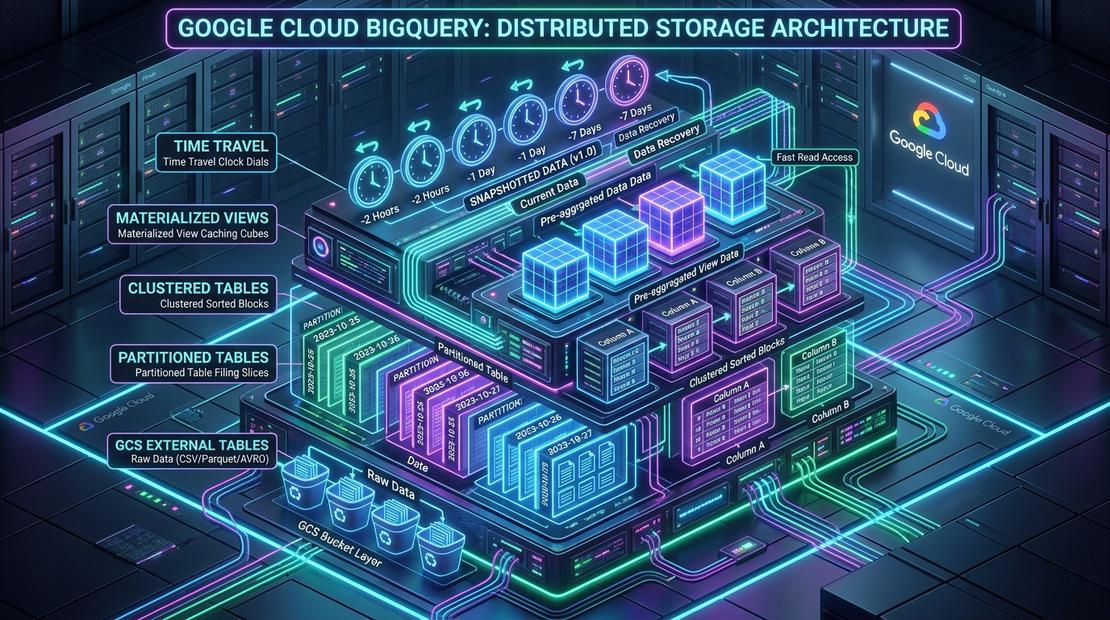
When software engineers build an application, success has a very clear definition.
The API accepts a payload, charges a credit card, reserves a seat in an operational database, emails a PDF confirmation to the customer, and writes a receipt. Response code: 200 OK. Latency: 42 milliseconds. The software engineer celebrates. The job is done.
Then Monday morning arrives.
The CEO and head of finance walk into the room with three seemingly simple questions:
- Which flight routes generated the most profit over the weekend?
- Did any payment authorizations fail silently after the seats were held?
- Which airports are seeing cancellations spike compared to this time last year?
Suddenly, the production database is useless. Running heavy aggregations across millions of rows locks active customer transactions, starves connection pools, and risks bringing down the booking engine. The transactional system that can handle one passenger booking in milliseconds is completely unequipped to explain what is happening across the entire business.
This exact tension is where data engineering begins.
It does not start with an intimidating architecture diagram packed with twenty Google Cloud icons. It starts when a business outgrows its transactional application and needs to answer analytical questions without breaking production.
To understand how these primitives fit together in practice, consider the trajectory of Offvia, a regional flight booking platform. Rather than starting with an abstract blueprint, each component in the platform emerged as a direct response to a concrete operational failure—from a slow dashboard to a runaway query bill, a silent accounting drift, and a late-night production corruption.
1. Day 1: Why Event Files in Cloud Storage? (External Tables)
At 9:07 AM on launch day, Offvia sold its very first plane ticket.
A traveler in Milan booked a weekend getaway to Barcelona. The booking service validated the credit card, confirmed seat 14B with the airline, emailed the confirmation, and emitted a single transaction receipt into Google Cloud Storage:
gs://offvia-bookings/raw/2026/09/18/booking_000001.parquetBy Sunday night, Offvia had processed 180 bookings. Each transaction landed as its own Parquet file in the bucket.
On Monday morning, the founders asked their first analytical question:
Which departure airports saw the highest demand this weekend, and did any bookings fail after payment processing?
Why Not Just Run SQL on the Operational Database?
Every software engineer initially asks: Offvia’s web app already runs on a database like Cloud SQL (PostgreSQL or MySQL). When a user books a flight, the app executes an INSERT. Why can’t we simply run CRUD operations and query that database directly?
-- Why not just run this on our live production database?
SELECT
  origin_airport,
  COUNT(*) AS bookings,
  COUNTIF(booking_status = 'FAILED') AS failed_bookings
FROM bookings
GROUP BY origin_airport;
In production, querying the operational database for analytics creates two severe failures:
- OLTP vs. OLAP (Lock Contention & Outages):
Operational databases are optimized for OLTP (Online Transaction Processing)—handling thousands of rapid, row-level read/write transactions per second with strict ACID guarantees. Analytical queries do the opposite: they scan hundreds of thousands of rows to aggregate metrics. Running analytical table scans on your primary database acquires shared read locks, evicts hot transactional cache from memory (buffer pool), and exhausts connection pools. While your query aggregates airport statistics, active travelers trying to checkout experience latency spikes and
504 Gateway Timeouterrors. - Mutable State vs. Immutable Event History:
A transactional database stores current state, not historical truth. If a customer cancels their booking tomorrow, the application runs:The original record—that the seat was booked and paid on launch day—is overwritten. For financial reconciliation, historical reporting, and system replayability, you need an immutable event log: an unchangeable receipt of every transaction exactly as it happened.SQL 1 line
UPDATE bookings SET booking_status = 'CANCELLED' WHERE booking_id = 'booking_000001';
Why Cloud Storage and Parquet?
Instead of overloading the production database, the booking API writes an event receipt to Google Cloud Storage (GCS) for every completed booking.
- Cloud Storage provides virtually limitless, 99.999999999% durable, low-cost object storage ($0.02 per GB/month for standard class). Dumping transaction receipts into GCS decouples analytics from the transactional application entirely.
- Why Parquet instead of CSV or JSON? JSON and CSV are uncompressed plain text without strict data types. Every downstream tool must read 100% of the text across the network and parse strings. Apache Parquet is a binary columnar format with:
- Embedded Schema & Types: Timestamps, integers, and decimals are preserved with strict typing.
- Columnar Layout: Query engines can read only the columns needed (e.g.,
origin_airportandbooking_status) without scanning the rest of the record. - Block Metadata: Parquet stores min/max statistics for every column chunk, allowing readers to skip irrelevant data blocks before reading bytes off disk.
The Solution: BigQuery External Tables
Rather than building an elaborate ETL pipeline (Cloud Pub/Sub, Dataflow, Cloud Composer) for just 180 files, Offvia created a BigQuery External Table.
An external table stores only the table schema and metadata pointers inside BigQuery. The actual Parquet files remain untouched in Cloud Storage. When someone runs SQL, BigQuery’s compute slots stream the files directly across Google’s high-speed Jupiter network fabric.
CREATE OR REPLACE EXTERNAL TABLE `offvia_lake.bookings_raw`
OPTIONS (
  format = 'PARQUET',
  uris = ['gs://offvia-bookings/raw/*']
);
Within five minutes, the team ran standard ANSI SQL against their raw storage:
SELECT
  origin_airport,
  COUNT(*) AS bookings,
  COUNTIF(booking_status = 'FAILED') AS failed_bookings
FROM `offvia_lake.bookings_raw`
GROUP BY origin_airport
ORDER BY bookings DESC;
The Trade-Off Accepted: External tables allow instant querying with zero pipeline maintenance, but every query must list and read external files over the network. For 180 files, this takes milliseconds. As file counts grow into tens of thousands, that object-listing overhead becomes a bottleneck. Furthermore, external tables do not benefit from BigQuery’s native physical optimizations, automated storage management, or result caching in the same way managed tables do.
When to consider BigLake: If your architecture requires querying Cloud Storage files while enforcing fine-grained row-level, column-level security, or data masking without granting users raw object read permissions in GCS, evaluate BigLake tables rather than standard external tables.
2. Month 1: The 45-Second Dashboard Spinner (Native Managed Tables)
One month later, Offvia had scaled to approximately 5,000 bookings a day.
The operations team built an executive Looker dashboard displaying real-time route volume, ticket sales, flight cancellations, and seat occupancy. Every morning, route managers opened the dashboard to review yesterday’s numbers.
Why the External Table Setup Broke
In this scenario, dashboard tiles spun for 45 to 60 seconds. Frustrated managers hit “Refresh”, kicking off duplicate queries that saturated compute slots.
The SQL had not changed. The physical storage layer had outlived its initial purpose:
- The external table now referenced tens of thousands of small Parquet files in Cloud Storage.
- For every query, BigQuery spent considerable time calling Cloud Storage object-listing APIs to determine which files existed before executing analytical work.
- Compute slots spent valuable time negotiating HTTP file transfers across the network rather than computing aggregations.
- Because data lived outside BigQuery’s managed storage engine, queries could not leverage BigQuery’s native Capacitor columnar layouts, automated metadata pruning, or optimized Colossus storage access.
The Solution: BigQuery Native Managed Tables
Offvia migrated its analytics path to a BigQuery Native Managed Table.
When data is loaded into BigQuery-managed storage, BigQuery converts it into Capacitor—Google’s proprietary columnar format—and distributes it across Colossus, Google’s high-speed distributed file system, physically separated from compute slots (Borg) across Google’s petabit-scale Jupiter network fabric.
- Column Pruning: If a dashboard queries only
carrier_codeandfare_amount, BigQuery physically reads only those two columns off disk. The remaining 30+ columns in the booking record are skipped completely. - Colossus Throughput: Data lives natively in Google’s managed storage layer, eliminating external HTTP object-listing overhead.
- Long-Term Storage Pricing: If a table (or an individual partition) is not modified for 90 consecutive days, BigQuery automatically lowers the storage rate by 50% (from active storage at $0.020/GB/month to long-term storage at $0.010/GB/month), with zero reduction in query performance.
CREATE OR REPLACE TABLE `offvia_dw.bookings_managed` AS
SELECT
  booking_id,
  passenger_full_name,
  passport_number,
  contact_email,
  payment_token,
  carrier_code,
  flight_number,
  origin_airport,
  destination_airport,
  departure_timestamp,
  ingested_at,
  cabin_class,
  fare_amount,
  booking_status,
  retry_count
FROM `offvia_lake.bookings_raw`;
The Looker dashboard now queries the managed table directly:
SELECT
  carrier_code,
  COUNT(*) AS bookings,
  SUM(fare_amount) AS revenue
FROM `offvia_dw.bookings_managed`
GROUP BY carrier_code;
Result: In this benchmark scenario, dashboard latency dropped from approximately 48 seconds to under a second.
The Trade-Off Accepted: Performance requires operational discipline. The moment Offvia introduced a managed table, the team accepted pipeline duties: defining ingestion frequency, deduplicating retried uploads, and handling schema drift. Cloud Storage remains the immutable raw archive; BigQuery is the analytical engine.
3. Month 3: The One-Day Query That Scanned Two Years (Date Partitioning)
Three months later, Offvia signed partnerships with regional airlines and loaded two full years of historical flight booking data. In this scenario, the managed table grew to approximately 2.84 TiB across 450 million rows.
Finance opened their daily reconciliation dashboard to check yesterday’s flight departures:
SELECT
  carrier_code,
  origin_airport,
  destination_airport,
  COUNT(*) AS total_passengers,
  SUM(fare_amount) AS route_revenue
FROM `offvia_dw.bookings_managed`
WHERE departure_timestamp >= TIMESTAMP '2026-09-18 00:00:00+00'
  AND departure_timestamp <  TIMESTAMP '2026-09-19 00:00:00+00'
GROUP BY 1, 2, 3;
Why the Unpartitioned Query Exploded
The query requested one single day of departures (roughly 2.8 GiB of data).
Yet when the query finished, BigQuery scanned the entire 2.84 TiB table!
Why? Because the table had no physical boundaries. An unpartitioned table is like an enormous file drawer containing two years of receipts stored without date separation. To find receipts for September 18, BigQuery had to inspect every single storage block in the table.
The Math of an Unpartitioned Query (Illustrative On-Demand Pricing):
• 1 Run: 2.84 TiB scanned × $6.25/TiB = $17.75 per run
• 6 runs/hour × 24 hours × 30 days = $7,668/month for one dashboard tile!
Crucial Data Engineering Law: A
WHEREclause describes what rows you want. It does not automatically guarantee that the storage engine can skip reading everything else.
The Solution: Date Partitioning
Offvia rebuilt the table with Date Partitioning on departure_timestamp.
Partitioning segments table storage based on the date expression. When a query filters by 2026-09-18, BigQuery inspects table metadata, reads only the partition corresponding to that date, and prunes the remaining historical partitions from the scan.
CREATE OR REPLACE TABLE `offvia_dw.bookings_partitioned`
PARTITION BY DATE(departure_timestamp)
OPTIONS (
  require_partition_filter = true,
  description = 'Core bookings partitioned by flight departure date'
) AS
SELECT *
FROM `offvia_dw.bookings_managed`;
The Production Safeguard: require_partition_filter = true
Notice line 4: require_partition_filter = true.
This is a production guardrail. If an analyst or automated tool queries this table without specifying an eligible partition filter on departure_timestamp in the WHERE clause, BigQuery rejects the query before execution:
Cannot query over table 'offvia_dw.bookings_partitioned' without a filter over column(s) 'departure_timestamp' that can be used for partition elimination.Result: In this benchmark scenario, bytes scanned fell from roughly 2.84 TiB to 2.8 GiB, reducing per-query scan costs by over 99%.
4. Month 6: Pruning Inside Date Drawers (Table Clustering)
Offvia launched an airline partner portal. Partner airlines like Delta (DL), British Airways (BA), and Lufthansa (LH) could log in to inspect their passenger occupancy and route volume for the previous 30 days.
Delta’s portal dashboard executed this query:
SELECT
  booking_id,
  flight_number,
  origin_airport,
  destination_airport,
  fare_amount
FROM `offvia_dw.bookings_partitioned`
WHERE departure_timestamp >= TIMESTAMP '2026-08-20 00:00:00+00'
  AND departure_timestamp <  TIMESTAMP '2026-09-19 00:00:00+00'
  AND carrier_code = 'DL';
Why Partitioning Alone Was Not Enough
Partition pruning worked as designed: BigQuery opened only the 30 daily partitions and ignored the rest of history.
However, each daily partition contained flights from every partner airline. In this scenario, Delta accounted for only a fraction of rows across that 30-day window.
To extract those rows, BigQuery still had to scan approximately 84 GiB of data across all 30 partitions because rows for different carriers were intermingled across storage blocks.
Partitioning answered:
Which dates should I open?
It could not answer:
Where inside those dates can I find Delta?
The Solution: Multi-Column Clustering
Offvia added Table Clustering on carrier_code and booking_status.
Clustering sorts and co-locates data within each partition based on the contents of the clustered columns (up to 4 columns). BigQuery tracks minimum and maximum values for every storage block in its metadata.
When a query filters on carrier_code = 'DL', BigQuery evaluates block metadata. If a block’s value range contains only carriers AA through BA, BigQuery skips that block without reading it from disk.
CREATE OR REPLACE TABLE `offvia_dw.bookings`
PARTITION BY DATE(departure_timestamp)
CLUSTER BY carrier_code, booking_status
OPTIONS (
  require_partition_filter = true,
  description = 'Core bookings table partitioned by flight date and clustered by carrier'
) AS
SELECT *
FROM `offvia_dw.bookings_partitioned`
WHERE departure_timestamp >= TIMESTAMP '2000-01-01 00:00:00+00';
Why Column Order in Clustering Matters
Clustering is strictly hierarchical:
- Data is sorted first by
carrier_code. - Within each
carrier_code, data is sorted bybooking_status.
A query filtering on carrier_code = 'DL' AND booking_status = 'CONFIRMED' receives optimal block pruning. A query filtering only on booking_status receives less pruning because the primary sort order is carrier_code.
Clustering Reality Check: Clustering is a physical co-location optimization, not an index. BigQuery executes best-effort automatic re-clustering in the background as new data lands. Pruning efficiency depends on table size (most beneficial on tables >1 GB), column cardinality, and query predicate shape. Always order clustering columns starting with your highest-cardinality, most frequently filtered equality column.
5. Month 9: The Booking That Arrived a Day Late (Dual-Timestamp Modeling)
Offvia launched long-haul transcontinental routes and in-flight upgrades.
A passenger on a flight from San Francisco to Tokyo purchased an in-flight business class seat upgrade at 11:50 PM on Monday.
Midway across the Pacific, the aircraft lost satellite connectivity. The onboard terminal stored the transaction receipt locally in offline memory.
At 4:10 AM on Tuesday, the plane touched down in Tokyo, reconnected to ground Wi-Fi, and batch-uploaded the accumulated flight receipts to Cloud Storage.
Why the Existing Pipeline Drifted
On Tuesday morning, finance noticed an accounting anomaly:
- Tuesday 08:00 AM: Monday revenue reported at $1,420,000.
- Tuesday 11:00 AM: The same Monday revenue report re-ran and showed $1,455,000.
Finance was alarmed: “Why are closed historical financial numbers changing retroactively?”
The data pipeline had partitioned the table by ingestion time (_PARTITIONTIME / load timestamp):
- Because the receipt arrived in the cloud on Tuesday morning, BigQuery assigned it to Tuesday’s partition.
- But the flight departed and the service was delivered on Monday.
- When automated reconciliation backfilled the transaction into Monday’s flight date, it silently altered Monday’s closed revenue report.
The Solution: Dual-Timestamp Modeling
In distributed, real-world systems, you must never confuse when an event happened in the real world with when your cloud platform received the byte stream.
Offvia established a formal data contract with two explicit timestamps:
-- Explicit timestamp separation in offvia_dw.bookings
departure_timestamp TIMESTAMP NOT NULL,  -- Event Time: Which flight owns this activity
ingested_at          TIMESTAMP NOT NULL   -- Ingestion Time: When cloud storage saw the record
The table remains partitioned by DATE(departure_timestamp). The two timestamps serve different consumers:
1. Business Reports Use Event Time
Financial reporting groups strictly by the flight date, ensuring metrics reflect physical operations:
SELECT
  DATE(departure_timestamp) AS flight_date,
  SUM(fare_amount) AS revenue
FROM `offvia_dw.bookings`
WHERE departure_timestamp >= TIMESTAMP '2026-09-18 00:00:00+00'
  AND departure_timestamp <  TIMESTAMP '2026-09-19 00:00:00+00'
GROUP BY flight_date;
2. Incremental Pipelines Use Ingestion Time
Downstream pipelines query using an ingestion watermark so they never miss records arriving days late for an older flight:
SELECT *
FROM `offvia_dw.bookings`
WHERE departure_timestamp >= TIMESTAMP_SUB(@current_watermark, INTERVAL 7 DAY)
  AND departure_timestamp <  TIMESTAMP_ADD(@current_watermark, INTERVAL 1 DAY)
  AND ingested_at > @previous_watermark
  AND ingested_at <= @current_watermark;
The Operational Policy
Dual timestamps make late arrivals visible and processable, but they don’t solve financial accounting alone. Offvia established a clear business policy:
- Daily revenue reports remain provisional for 24 hours.
- A daily reconciliation job incorporates late arrivals up to 24 hours after flight completion.
- Transactions arriving after 24 hours are recorded as prior-period adjustments rather than silently rewriting closed historical tables.
6. Month 12: The Monday 9:00 AM Executive Storm (Materialized Views)
By Month 12, Offvia had dozens of route managers, pricing analysts, and executives. Every Monday at 9:00 AM, users opened Looker to run weekly route performance reviews.
One critical dashboard tile calculated gross route revenue, passenger counts, and average ticket yield across every airline and cabin class:
SELECT
  carrier_code,
  cabin_class,
  TIMESTAMP_TRUNC(departure_timestamp, MONTH) AS travel_month,
  SUM(fare_amount) AS total_revenue,
  COUNT(*) AS total_passengers,
  AVG(fare_amount) AS average_fare
FROM `offvia_dw.bookings`
WHERE departure_timestamp >= TIMESTAMP '2025-01-01 00:00:00+00'
GROUP BY 1, 2, 3;
Why Compute Slots Saturated
Partitioning pruned dates older than 2025. Clustering helped queries targeting a single airline.
However, this executive query intentionally aggregated every airline, every cabin class, and multiple years of history.
When hundreds of users loaded this tile simultaneously:
- BigQuery was asked to compute the exact same massive aggregation repeatedly.
- Project slot reservations saturated.
- Queries queued up, dashboard tiles experienced latency spikes, and users kept refreshing browsers.
The Solution: Materialized Views with Smart Tuning
Offvia deployed a BigQuery Materialized View.
A standard logical view is just a saved query: when you run it, BigQuery executes the underlying SQL from scratch.
A Materialized View precomputes and persists the aggregation results in native Capacitor storage. BigQuery automatically maintains these views incrementally:
- Transparent Smart Tuning: Analysts and Looker do not need to rewrite their queries. They continue querying
offvia_dw.bookings. BigQuery’s cost-based query optimizer detects that an existing Materialized View covers the aggregation, rewrites the query execution plan in the background, and reads the precomputed result. - Incremental Maintenance & Freshness: For supported append-only workloads, when new bookings land in the base table, BigQuery reads the precomputed summary and joins only the fresh un-materialized rows on the fly, delivering fresh results without a full recompute.
- Fallback Protection: If base table changes or query shapes invalidate incremental materialization, BigQuery transparently falls back to querying the base table to guarantee correctness.
CREATE MATERIALIZED VIEW `offvia_dw.mv_monthly_route_metrics`
OPTIONS (
  enable_refresh = true,
  refresh_interval_minutes = 30
) AS
SELECT
  carrier_code,
  cabin_class,
  TIMESTAMP_TRUNC(departure_timestamp, MONTH) AS travel_month,
  SUM(fare_amount) AS total_revenue,
  COUNT(*) AS total_passengers,
  AVG(fare_amount) AS average_fare
FROM `offvia_dw.bookings`
WHERE departure_timestamp >= TIMESTAMP '2025-01-01 00:00:00+00'
GROUP BY 1, 2, 3;
7. Month 15: Sunday 2:15 AM Full-Table Corruption (Time Travel & Snapshots)
At 2:15 AM on a Sunday, an on-call data engineer ran a database maintenance script intended to clean up abandoned, unpaid reservations.
The intended SQL was:
WHERE booking_status = 'PENDING'
  AND retry_count > 3
A deployment packaging bug omitted the WHERE clause. The script executed this statement against the live production warehouse:
UPDATE `offvia_dw.bookings`
SET booking_status = 'CANCELLED'
WHERE 1 = 1;
In seconds, every booking in the table was marked as cancelled.
At 2:18 AM, alert channels exploded. Flight check-in kiosks at airports were rejecting passengers.
The operational challenge was immediate:
How can we recover the verified state of this table as it existed prior to the destructive update, while properly auditing any valid intervening writes?
The Solution: BigQuery Time Travel & Table Snapshots
Offvia leveraged BigQuery Time Travel.
BigQuery automatically retains a complete historical record of table modifications for a configurable window (by default 7 days, configurable between 2 and 7 days at the dataset level). You can query any historical state using the FOR SYSTEM_TIME AS OF clause.
Safe Production Recovery Runbook
A senior engineer does not blindly overwrite production during an active incident. The safe operational sequence involves isolating the historical state, auditing intervening changes, and executing a controlled cutover:
Step 1: Temporarily Lift the Partition Filter Guardrail
Because offvia_dw.bookings enforced require_partition_filter = true, the engineer temporarily disabled it to allow a full-table restore:
ALTER TABLE `offvia_dw.bookings`
SET OPTIONS (require_partition_filter = false);
Step 2: Extract Historical State to a Recovery Table
Query the table as it existed immediately prior to the destructive update:
CREATE OR REPLACE TABLE `offvia_recovery.bookings_before_bad_update` AS
SELECT *
FROM `offvia_dw.bookings`
FOR SYSTEM_TIME AS OF TIMESTAMP_SUB(CURRENT_TIMESTAMP(), INTERVAL 20 MINUTE);
Step 3: Validate and Audit Intervening Records
Verify that confirmed bookings are intact, and check whether any legitimate transactions occurred during the incident window that need to be merged:
SELECT
  booking_status,
  COUNT(*) AS rows
FROM `offvia_recovery.bookings_before_bad_update`
GROUP BY booking_status;
Step 4: Controlled Cutover Back to Production
Rebuild the production table from the verified recovery table and re-enable the safety guardrails:
CREATE OR REPLACE TABLE `offvia_dw.bookings`
PARTITION BY DATE(departure_timestamp)
CLUSTER BY carrier_code, booking_status
OPTIONS (
  require_partition_filter = true,
  description = 'Core bookings table restored after incident validation'
) AS
SELECT *
FROM `offvia_recovery.bookings_before_bad_update`;
Important Recovery Reality: Time Travel is a point-in-time recovery mechanism, not a magic undo button. If valid transactions were written after the incident timestamp, a naive overwrite would discard those intervening records unless explicitly merged. Furthermore, Recovery Time Objective (RTO) depends on data volume, query complexity, and slot capacity—there is no universal or guaranteed RTO. Time Travel covers recent operational mistakes (up to 7 days), whereas Table Snapshots are designed for long-term, read-only recovery points before scheduled migrations.
DROP, DELETE, or UPDATE statements.-- Creating a zero-copy snapshot before a major deployment
CREATE SNAPSHOT TABLE `offvia_backups.bookings_pre_migration_2026_q3`
CLONE `offvia_dw.bookings`
OPTIONS (
expiration_timestamp = TIMESTAMP '2026-12-31 00:00:00+00',
description = 'Pre-migration recovery point for Q3 platform release'
);8. Month 18: The Aviation Regulatory Audit (Authorized Views)
To operate international routes, Offvia was legally required to share passenger volume, route frequency, and load factors with the Civil Aviation Authority (CAA) for compliance and antitrust audits.
The CAA auditor required read access to run SQL queries over the past 36 months of route operations.
Why Direct Table Sharing Breaks
Offvia’s core table offvia_dw.bookings contained sensitive passenger records:
passenger_full_namepassport_numbercontact_emailpayment_token
Granting the external auditor read access to the entire dataset would violate the principle of least privilege and expose customer Personally Identifiable Information (PII).
Exporting monthly CSV dumps was equally flawed: it created stale snapshots, duplicate storage, and unmonitored files floating in external environments.
The Solution: BigQuery Authorized Views
Offvia implemented a BigQuery Authorized View.
An Authorized View allows you to share query results with specific users or groups without giving them direct access to the underlying tables.
Step 1: Create the Restricted View in a Separate Dataset
Offvia created an audit-specific dataset offvia_audit and defined the view:
CREATE OR REPLACE VIEW `offvia_audit.daily_route_occupancy` AS
SELECT
  carrier_code,
  origin_airport,
  destination_airport,
  DATE(departure_timestamp) AS flight_date,
  COUNT(*) AS total_passengers,
  SUM(fare_amount) AS total_fare_revenue
FROM `offvia_dw.bookings`
WHERE departure_timestamp >= TIMESTAMP '2024-01-01 00:00:00+00'
GROUP BY 1, 2, 3, 4;
Step 2: Authorize the View to Access the Protected Dataset
In the Google Cloud console:
- Navigate to the source dataset
offvia_dw. - Click Sharing → Authorize Views.
- Select
offvia_audit.daily_route_occupancy. - Grant the auditor IAM permissions (
roles/bigquery.dataViewerandroles/bigquery.jobUser) on theoffvia_auditdataset only. - Do not grant the auditor any permissions on
offvia_dw.
When the auditor queries offvia_audit.daily_route_occupancy, BigQuery uses the view’s internal authorization to read the underlying bookings table. If the auditor attempts to run SELECT * FROM offvia_dw.bookings, BigQuery immediately blocks them with Access Denied.
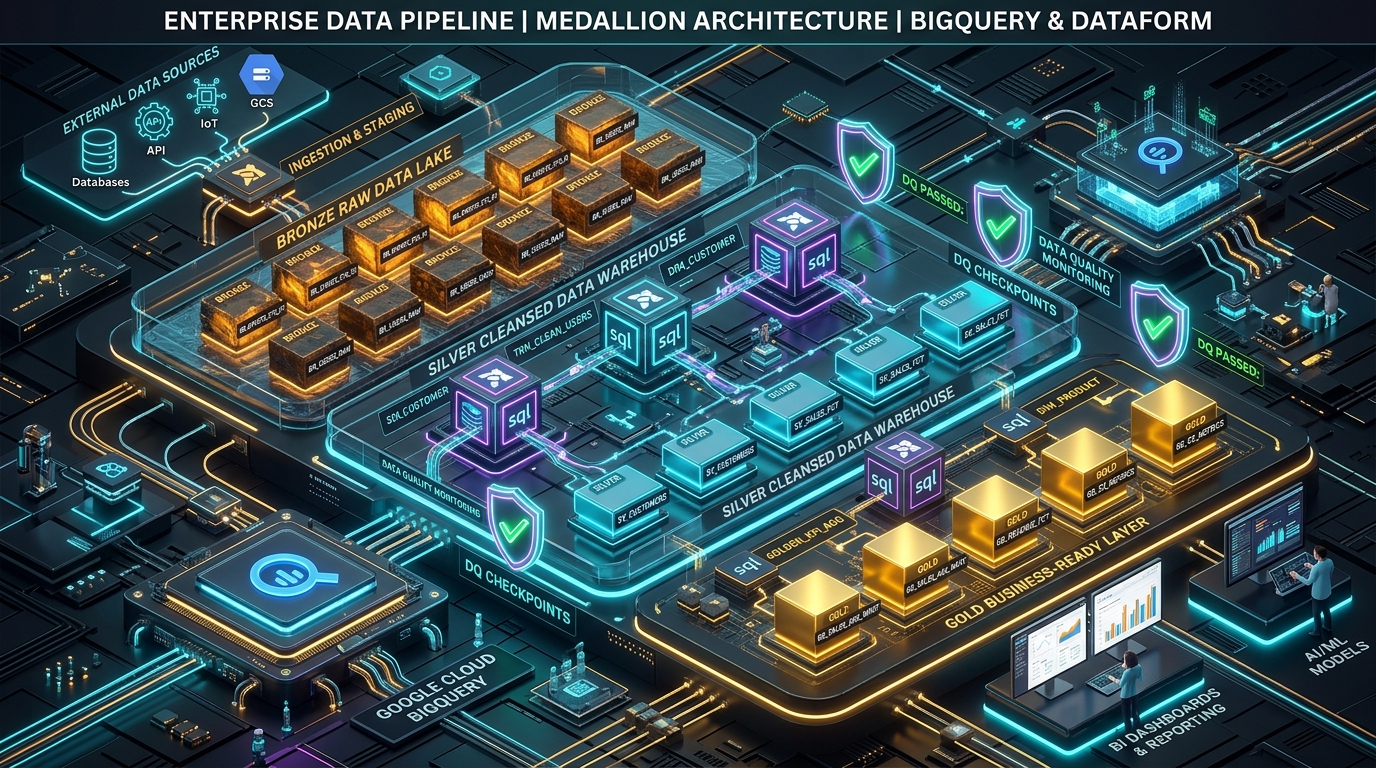
The Complete Architecture: Why Every Building Block Exists
Now—and only now—does it make sense to view the final enterprise architecture.
Notice how clearly the three architectural layers emerged:
- The Raw Landing Layer (Cloud Storage): Preserves immutable receipts as they occurred in reality. Essential for auditing, backfills, and system-wide data replays.
- The Core Analytical Layer (Partitioned & Clustered BigQuery): Stores structured Capacitor columnar data optimized for internal analytics, partitioned by flight date and clustered by carrier.
- The Governed Serving Layer (Materialized & Authorized Views): Exposes precomputed summaries for high-concurrency dashboards and restricted, privacy-compliant interfaces for external consumers.
| Growth Milestone | Real Problem Encountered | GCP Storage Primitive | Architectural Value |
|---|---|---|---|
| Day 1: Launch | Need instant SQL answers without building pipelines | External Table | Zero infrastructure overhead; query in place. |
| Month 1: Growth | Dashboard tiles lag due to file listing overhead | Managed Table | Columnar pruning on Colossus for sub-second queries. |
| Month 3: Bill Shock | Single-day queries scan entire multi-year table | Date Partitioning | Prune 99.9% of historical storage blocks. |
| Month 6: Portals | Multi-day queries scan large volumes across all airlines | Multi-Column Clustering | Sort blocks by carrier to prune inside date partitions. |
| Month 9: Data Drift | Offline in-flight purchases drift closed financial days | Dual-Timestamp Contract | Separate business event time from ingestion watermarks. |
| Month 12: High Traffic | Concurrent users saturate BigQuery compute slots | Materialized View | Precompute aggregations with transparent query tuning. |
| Month 15: Corruption | Destructive DML update alters table state | Time Travel & Snapshots | Point-in-time recovery and pre-migration freeze points. |
| Month 18: Audit | Regulator needs route counts without seeing passenger PII | Authorized View | Expose audited aggregates without granting base table access. |
The Practical Decision Framework
When you design your next data platform on Google Cloud, do not begin by drawing all eight components. Use this decision matrix to determine when to add each building block:
| If you are experiencing… | The immediate GCP primitive to evaluate |
|---|---|
| Occasional exploration of files landing in Cloud Storage | External Table (or BigLake for fine-grained access control) |
| Dashboards and apps querying the same datasets repeatedly | Native Managed Table in BigQuery |
| Queries scanning large irrelevant historical date ranges | Date Partitioning (with require_partition_filter = true) |
| Queries repeatedly filtering by selective fields inside dates | Table Clustering (order by highest cardinality equality filter) |
| Offline devices, network delays, or late-arriving records | Dual-Timestamp Modeling (event_time vs ingested_at) |
| Hundreds of users running identical heavy aggregations | Materialized Views with automatic refresh |
| Vulnerability to accidental updates or risky schema migrations | Time Travel for recovery; Table Snapshots for releases |
| Sharing aggregates with external partners or auditors | Authorized Views (or Authorized Datasets) |
What Comes Next
Architecture is only half the battle. In Part 2 of this series, we will roll up our sleeves and implement this exact system hands-on from scratch:
- Writing booking records to Cloud Storage using the Google Cloud SDK.
- Creating and profiling an External Table.
- Ingesting into a Partitioned and Clustered BigQuery Managed Table.
- Simulating a late-arriving offline flight upgrade and handling it with ingestion watermarks.
- Creating a Materialized View and validating that BigQuery’s optimizer rewrites incoming queries transparently.
- Triggering an accidental destructive
UPDATEand executing the full Time Travel recovery runbook. - Configuring an Authorized View and testing cross-dataset IAM delegation.
Great data engineering isn’t about using every tool Google Cloud sells. It’s about knowing exactly which problem each tool was built to solve.



Community Discussion 0