

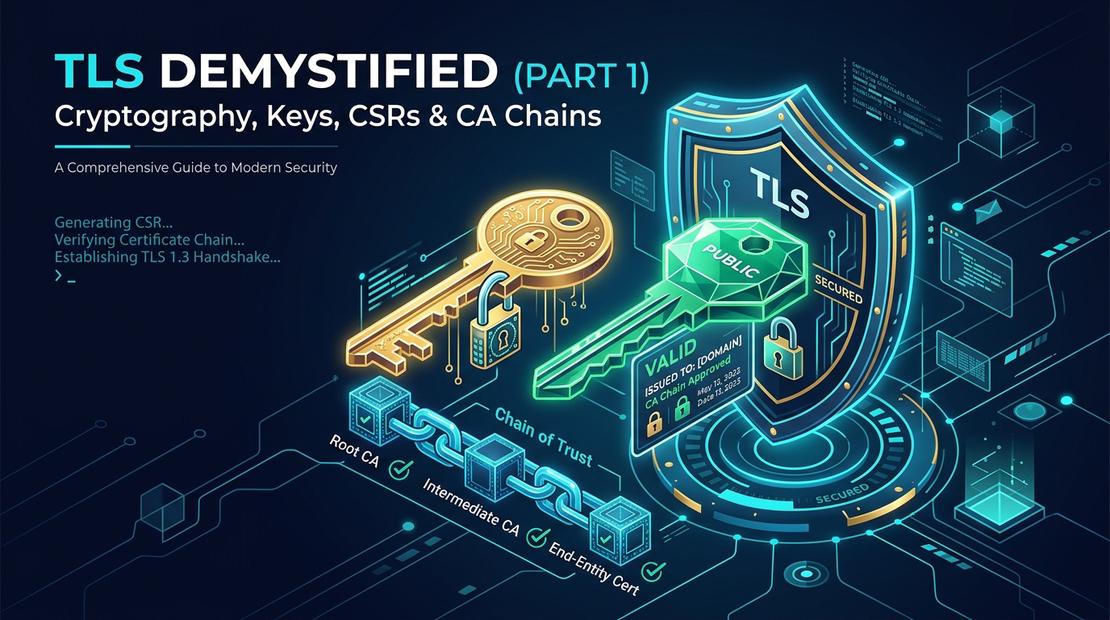
When you enter a password, submit credit card details, or deploy an ingress route right now, how do you know someone isn’t silently sniffing every byte you send?
Look at the top of your web browser. Right next to the address bar, you will see a small padlock icon. If you click it, your browser displays a reassuring message: “Connection is secure.”
We rely on that tiny lock hundreds of times a day. But what is actually happening behind that symbol? Why is an open network like the internet so vulnerable to eavesdropping by default, and how does your browser prove you are talking to the legitimate website rather than an imposter?
Welcome to Part 1 of our 3-Part Deep Dive into TLS & mTLS Architecture for DevOps Engineers:
- Part 1 (You Are Here): The Alice & Bob Foundation: Keys, CSRs, Public vs. Private PKI, and the Chain of Trust.
- Part 2: The Modern TLS Handshake (TLS 1.2 vs 1.3), Cipher Suites, and Real-World SSL Debugging.
- Part 3: Mutual TLS (mTLS), Java KeyStores vs. TrustStores, and Surviving Production Certificate Expirations.
1. Why TLS Exists: The Postcard Internet
When you send a traditional letter inside a sealed envelope, you expect privacy. But the original internet wasn’t built with envelopes—it was built with postcards.
Whenever you browse an unprotected website (http://), your computer transmits plain text messages across an open network. Your data hops through dozens of intermediate systems:
- The public Wi-Fi router at your local coffee shop.
- Your Internet Service Provider (ISP).
- Commercial backbone routers and switches spanning continents.
Anyone handling an open postcard can read every word written on it. If you write your credit card number, login password, or private messages on a postcard, anyone along the delivery route can inspect it, photocopy it, or even take an eraser and rewrite the numbers.
This open design created three fundamental security challenges:
- Eavesdropping: Anyone with packet-sniffing access on the network path can inspect plain text traffic.
- Tampering: Intermediate actors can modify data in transit without either party knowing.
- Impersonation: A rogue server can pretend to be your target bank or API, and you would have no native way to verify its true identity.
To solve this, TLS (Transport Layer Security) is designed to provide three fundamental security properties:
- Confidentiality: Bulk symmetric encryption prevents passive eavesdroppers from reading traffic. (Note: Metadata like packet sizes and destination IP/SNI may remain observable unless specific padding or Encrypted Client Hello is used.)
- Integrity: Authenticated encryption (AEAD) ensures that any in-transit modification or tampering causes the connection to terminate immediately.
- Authentication: Digital signatures and X.509 certificates verify that the server (and optionally the client in mTLS) legitimately owns the identity it claims.
2. Public-Key Cryptography: The Alice, Bob, and Padlock Story
Before exploring modern protocol mechanics, let’s look at how two parties—Alice and Bob—solve the problem of establishing trust and privacy across an open, untrusted postal route.
Bob wants anyone in the world (including Alice) to be able to send him confidential mail, even if Bob and Alice have never met in person before.
1. The Open Padlock (Bob's Public Key): Bob buys thousands of identical metal padlocks, leaves them in the open (unlocked) state, and distributes them freely to anyone who asks.
2. The Secret Key (Bob's Private Key): Bob holds the single physical key that unlocks those padlocks. He keeps it safely in his pocket and never shares it with anyone.
3. Alice Locks the Message: Alice writes a private note, places it inside a metal briefcase, grabs one of Bob's open padlocks, snaps it shut (Click! 🔒), and sends it through the mail. Once snapped shut, even Alice cannot re-open the briefcase.
4. Bob Unlocks It: Eavesdroppers along the postal route cannot open the briefcase. Only Bob, using his private physical key, can unlock the padlock and read Alice's message.
3. The 3 Cryptographic Jobs: Authentication vs. Key Exchange vs. Encryption
In legacy TLS 1.2 handshakes, systems sometimes used static RSA key transport—where the client encrypted a secret directly using the server’s public key.
However, modern TLS 1.3 (RFC 8446) completely removed static RSA key exchange because it lacked Forward Secrecy (if the server’s private key was ever leaked in the future, all historically recorded encrypted traffic could be decrypted).
Modern TLS cleanly divides cryptographic work into three distinct roles:
1. Authentication (Digital Signatures)
The server's certificate contains an asymmetric public key. The server creates a digital signature over the handshake transcript using its private key (CertificateVerify) to prove it legitimately owns the certificate. The certificate's asymmetric key authenticates identity; it is NOT used to encrypt the session secret.
2. Key Exchange (Ephemeral Diffie-Hellman)
Client and server each generate one-time, ephemeral key pairs. Through Diffie-Hellman mathematics, both sides independently calculate the exact same shared secret without transmitting it over the wire. This guarantees Forward Secrecy.
3. Record Encryption (Symmetric AEAD via HKDF)
Using HKDF (HMAC-based Key Derivation Function), both endpoints derive temporary symmetric traffic keys from the shared secret. Authenticated Encryption with Associated Data (AEAD) encrypts application data at gigabits per second with native CPU acceleration (AES-NI / ARM Crypto).
🗺️ The Complete TLS Mental Model Flowchart
Here is the exact architectural pipeline from certificate verification to encrypted traffic:
4. 🚨 5 Fatal TLS Misconceptions Every DevOps Engineer Must Unlearn
Before configuring Ingress controllers or debugging certificate pipelines, let’s dispel the most common myths:
❌ Myth 1: "The certificate is the private key."
Reality: The certificate (.crt/.pem) is public and contains only your Public Key and domain identity. The Private Key (.key) is generated locally and must never leave your server.
❌ Myth 2: "The CSR contains the private key."
Reality: A CSR contains your Public Key and requested SANs. It is signed by your Private Key to prove possession, but contains zero private key material.
❌ Myth 3: "The CA creates and gives me my private key."
Reality: You generate the private key on your own machine. The CA only receives your CSR, verifies domain control, and issues a signed certificate containing your public key.
❌ Myth 4: "The public key encrypts all HTTPS traffic."
Reality: In TLS 1.3, certificate public/private keys are used for identity authentication rather than transporting the session secret. Ephemeral Diffie-Hellman (ECDHE) negotiates temporary symmetric session keys (AES-GCM/ChaCha20) that encrypt bulk application traffic.
❌ Myth 5: "Self-signed certificates have weaker encryption than CA certificates."
Reality: The mathematical cipher algorithms (AES-256, P-256) are identical. What self-signed certificates lack is trusted third-party identity verification, making them vulnerable to Man-in-the-Middle impersonation.
5. The Imposter Problem & CSRs (Certificate Signing Requests)
Now consider the core problem: What if an attacker named Eve intercepts the connection and presents her own public key, claiming to be Bob?
Alice would establish a secure, encrypted connection—but with Eve instead of Bob!
To prevent this Man-in-the-Middle impersonation, Bob cannot just send an unverified public key. Bob must submit a CSR to a Certificate Authority (CA) to get an official digital certificate.
📄 The Key-to-Certificate Pipeline
│
├──→ Extracts Public Key
│
└──→ Signs with Private Key (proves possession) & packages into CSR (server.csr) ──→ Submits to CA
│
↓ CA validates identity & signs
Signed Certificate (server.crt)
│
↓ Installed on Nginx / Ingress
Production TLS / HTTPS
A CSR (defined in RFC 2986 / PKCS #10) contains your Public Key, your organization details, and your domain names (SANs). It is signed by your Private Key to prove you possess the key pair.
Quick Comparison Cheat Sheet
| Term | What It Is | Role in Modern TLS | Is It Secret? |
|---|---|---|---|
Private Key (.key) | Secret cryptographic key kept strictly on the server. | Creates digital signatures during TLS authentication. | YES (Strictly Confidential) |
Public Key (.pub) | Public counterpart embedded in the X.509 certificate. | Used by clients to verify the server’s digital signatures. | No (Publicly Distributed) |
| Key Exchange (ECDHE) | Ephemeral key agreement protocol (X25519, P-256). | Both endpoints independently derive the shared session secret. | Temporary (Ephemeral) |
| CSR (Certificate Signing Request) | Standardized request bundle with Public Key & SANs. | Submitted to CA to obtain a signed certificate. | No |
| CA (Certificate Authority) | Accredited entity that verifies domain ownership. | Digitally signs certificates with its private key. | Public Root CAs are pre-trusted |
Digital Certificate (.crt, .pem) | X.509 document binding a Public Key to domain names. | Sent to clients during handshake for identity proof. | No |
| SAN (Subject Alternative Name) | Domain names, wildcards, or IP addresses certified. | Defines exact hosts the certificate is valid for. | No |
6. Digital Certificates: The Notarized Identity
Once the CA verifies you control the domain, it produces an X.509 Digital Certificate (RFC 5280).
Bob installs this certificate on his web server, Kubernetes Ingress controller, or OpenShift Edge Route and presents it to clients during the TLS handshake.
Key Length vs. File Size on Disk (Key Size ≠ File Size)
A frequent point of confusion is the difference between cryptographic key parameters and actual file sizes on disk:
Important: Key length refers to the mathematical bit-length of the underlying cryptographic key material, which is not the same as the size of the encoded private-key file or certificate on disk.
🔑 Cryptographic Key Strength (Bits)
- RSA 2048-bit: 2,048-bit modulus size (~112-bit security level). Baseline web standard.
- RSA 4096-bit: 4,096-bit modulus size (~128-bit security level). Commonly used for high-assurance CA keys, although CA key algorithms and sizes depend on the PKI's security policy.
- ECDSA P-256: 256-bit elliptic curve key. Provides ~128-bit security strength (commonly compared with RSA-3072 in NIST guidelines) with faster signature generation.
- AES-256: 256-bit symmetric session key for bulk data encryption.
📄 Physical File Sizes on Disk (Kilobytes)
- Private Key File (
server.key): ~250 bytes (ECDSA) to ~1.7 KB (RSA 2048) due to ASN.1 encoding headers, exponents, and prime factors in Base64 PEM text. - Single Certificate (
server.crt): ~1.2 KB to 2.5 KB. Contains public key, SANs, validity dates, extensions, and CA signature. - Full Chain Bundle (
fullchain.pem): ~3.5 KB to 6 KB (Leaf + Intermediate certificates combined).
7. Certificate Authorities: Public CAs vs. Private PKI & Certificate Management
Who issues and validates these certificates?
- Examples: Let's Encrypt, DigiCert, Sectigo, Google Trust Services.
- Trust Model: For publicly trusted certificates, the client typically already has the required root trust anchor in its trust store (pre-installed in OS, browser, or JVM).
- Use Case: Public internet websites, customer-facing SaaS apps, public REST APIs.
- Constraints: Requires verifiable public domain control (ACME RFC 8555). Cannot issue certificates for internal private DNS.
- Managed Private CA Services: AWS Private CA, Google Cloud Certificate Authority Service (CAS).
- PKI Engines & Tools: HashiCorp Vault PKI secrets engine, Smallstep
step-ca. - Certificate Management & Automation: Kubernetes
cert-manager(a controller that manages certificate lifecycles from Vault, ACME, or internal issuers). - Trust Model: Untrusted by default. Private PKI roots must be explicitly distributed and trusted across servers, JVM truststores, and containers.
- Use Case: Internal microservices, Kubernetes service meshes (Istio/Linkerd), internal mTLS, database connections.
8. The Chain of Trust: Root CAs vs. Intermediate CAs
How does a client verify a certificate? Trust is established through a hierarchical Chain of Trust:
🏛️ Root Certificate Authority (e.g., DigiCert Global Root CA / ISRG Root X1)
Trusted via client TrustStore. Root CA private keys are typically kept offline or under strict operational controls (HSMs and multi-party signing ceremonies).
🏢 Intermediate CA (e.g., Let's Encrypt R3 / DigiCert Global G2 TLS)
Issued by Root CA. Actively signs day-to-day end-entity web and API certificates.
📄 Leaf / End-Entity Certificate (e.g., api.gcloudcafe.com)
Installed on your Nginx reverse proxy, Ingress controller, Envoy proxy, or cloud load balancer.
Why Do Intermediate CAs Exist?
- Blast Radius & Risk Isolation: If a Root CA key is compromised, all certificates issued by it across the globe become invalid. Root CAs are therefore protected offline.
- Operational Agility: The Root CA issues Intermediate certificates valid for several years. The Intermediate CA stays online to handle daily customer requests. If an intermediate is compromised, only that single intermediate is revoked.
9. ⚠️ Critical Section: Does Certificate Chain Order Matter?
YES, certificate chain order matters critically!
According to the official TLS specification (RFC 5246 Section 7.4.2 & RFC 8446 Section 4.4.2), when bundling certificates into a single file (such as fullchain.pem or bundle.crt for Nginx, HAProxy, Envoy, or Kubernetes Secrets), they must be placed in strict top-down hierarchical order:
In your PEM bundle file, it must be structured as:
-----BEGIN CERTIFICATE-----
(Your Server / Leaf Certificate)
-----END CERTIFICATE-----
-----BEGIN CERTIFICATE-----
(Intermediate CA Certificate)
-----END CERTIFICATE-----
Why Incomplete or Out-of-Order Chains Cause Production Outages
Different TLS libraries and clients perform certificate path building differently. Some desktop browsers may attempt to dynamically fetch missing intermediates via AIA (Authority Information Access) or use locally cached intermediate certificates.
However, programmatic HTTP clients, CLI tools (curl), Java JVMs, Python urllib3, Go runtimes, and microservice frameworks require the complete, properly ordered chain directly from the TLS handshake. When the intermediate is missing or the order is inverted, they fail immediately with:
javax.net.ssl.SSLHandshakeException: PKIX path building failed
curl: (35) error:0A000086:SSL routines::certificate verify failed
Should you include the Root CA in
fullchain.pem? No. The Root CA is the trust anchor expected to already reside in the client’s local TrustStore. Sending the Root CA in the TLS handshake wastes packet bytes and is ignored or flagged by strict TLS validators.
10. What is a Self-Signed Certificate?
In a standard PKI setup, an accredited CA signs your certificate.
A Self-Signed Certificate is a certificate where the Subject and the Issuer are identical. You generate a private key and use that same key to sign its own public certificate—acting as your own root authority.
- Subject:
api.gcloudcafe.com - Issuer:
Let's Encrypt / DigiCert - Trust: Verified automatically via pre-installed root trust stores.
- Subject:
localhost - Issuer:
localhost(Self) - Trust: Untrusted by default unless manually installed into the client's trust store.
Generating a Self-Signed Certificate in 1 Command
For local development, Docker environments, or testing, you can generate a self-signed certificate in one step:
# Generate a 2048-bit RSA Key and a Self-Signed Certificate valid for 365 days
openssl req -x509 -newkey rsa:2048 -nodes \
  -keyout dev.key \
  -out dev.crt \
  -days 365 \
  -subj "/CN=localhost"
Self-Signed Leaf vs. Self-Signed Root CAs (The Crucial Difference)
- Self-Signed Leaf (End-Entity) Certificates: Useful for local Docker compose environments, isolated testbeds, and bootstrapping initial control planes before provisioning
cert-manager. However, using self-signed leaf certificates in production is dangerous when it leads developers to disable certificate verification (curl -k,InsecureSkipVerify: true,NODE_TLS_REJECT_UNAUTHORIZED=0), leaving connections vulnerable to Man-in-the-Middle attacks. - Self-Signed Root CAs (Private PKI): The standard, legitimate foundation of Private PKI (HashiCorp Vault, AWS Private CA, corporate intranets). The Root CA signs internal certificates, and administrators securely distribute and trust this private root across internal servers, Kubernetes clusters, and JVM truststores (
cacerts).
11. Anatomy of an X.509 Certificate
An X.509 certificate (RFC 5280) contains several structured fields:
📅 Validity Period
Not Before and Not After timestamps defining the active lifespan of the certificate.
🌐 Subject & SANs
Common Name (CN) and Subject Alternative Names listing all authorized domain names, wildcards, and IP addresses.
🏢 Issuer
Distinguished Name (DN) of the Certificate Authority that signed the certificate.
✍️ Digital Signature
Cryptographic signature generated by the CA's private key over the certificate payload.
12. Hands-On OpenSSL Lab: From Private Key to Verified Certificate
Let’s translate these concepts into a practical engineering workflow:
Step 1: Generate an ECDSA Private Key
openssl ecparam -name prime256v1 -genkey -noout -out server.key
File contents of server.key:
-----BEGIN EC PRIVATE KEY-----
MHcCAQEEIJe7x8yB9...[Base64 Encoded Private Key Data]...
-----END EC PRIVATE KEY-----
Step 2: Generate a Certificate Signing Request (CSR) with SAN
# Generate CSR with Subject and Subject Alternative Names (SAN)
openssl req -new -key server.key -out server.csr \
  -subj "/C=US/ST=California/L=San Francisco/O=GCloudCafe/CN=api.gcloudcafe.com" \
  -addext "subjectAltName=DNS:api.gcloudcafe.com,DNS:www.gcloudcafe.com"
Why SAN is Mandatory: Modern browsers, Go runtimes, and HTTP clients validate hostnames against Subject Alternative Names (SAN), not the legacy Common Name (CN). Always include
-addext "subjectAltName=..."when generating CSRs.
File contents of server.csr:
-----BEGIN CERTIFICATE REQUEST-----
MIICvDCCAaQCAQAw...[Public Key + Subject Identity + SAN Extensions]...
-----END CERTIFICATE REQUEST-----
Step 3: Inspect Certificate Metadata
# Inspect Subject, Issuer, and Validity dates
openssl x509 -in server.crt -noout -subject -issuer -dates

# Inspect Subject Alternative Names (SANs)
openssl x509 -in server.crt -noout -ext subjectAltName
Step 4: Verify Private Key Matches Certificate (Universal SHA-256 Public Key Digest)
To verify that a Private Key matches a Certificate, extract their public keys in DER format and compute their SHA-256 digests:
# Extract and hash public key from Certificate:
openssl x509 -in server.crt -noout -pubkey | openssl pkey -pubin -outform DER | sha256sum

# Extract and hash public key from Private Key:
openssl pkey -in server.key -pubout -outform DER | sha256sum
If the two SHA-256 hashes match identically, the private key and certificate are a valid cryptographic pair. This command works universally across RSA, ECDSA, and Ed25519 keys without relying on legacy algorithms.
📚 Authoritative Standards & References
To explore the underlying cryptographic specifications and RFC standards:
- RFC 8446: The Transport Layer Security (TLS) Protocol Version 1.3 (IETF Standard).
- RFC 5280: Internet X.509 Public Key Infrastructure Certificate and Certificate Revocation List (CRL) Profile.
- RFC 2986: PKCS #10: Certification Request Syntax Specification Version 1.7.
- RFC 8555: Automatic Certificate Management Environment (ACME).
- NIST SP 800-57: Recommendation for Key Management (Security Strength Comparisons).
Summary & What’s Next in Part 2
| Concept | Key Architectural Takeaway |
|---|---|
| Modern TLS Model | Digital signatures authenticate identity; Ephemeral Diffie-Hellman (ECDHE) negotiates shared secrets (Forward Secrecy); Symmetric AEAD ciphers encrypt bulk data. |
| What is a CSR? | An application bundle containing your public key and identity metadata sent to a CA. It never contains your private key. |
| Key Size ≠ File Size | Key size refers to mathematical bit strength (e.g., 2048-bit RSA, 256-bit ECDSA); File size reflects ASN.1/PEM-encoded structures on disk (~1.5 KB to 5 KB). |
| Public vs. Private PKI | Public CAs secure internet-facing traffic via globally pre-trusted root stores; Private PKI (Vault, AWS Private CA, cert-manager) secures internal microservices/mTLS. |
| Chain of Trust | Intermediates protect offline Root CAs. In server bundles, the Leaf certificate must be first, followed by Intermediates. |
Now that you have a rock-solid foundation on cryptographic roles, keys, CSRs, public/private PKI, and chain ordering, you are ready to explore the protocol handshake itself.
👉 Read Part 2: The Modern TLS Handshake (TLS 1.2 vs 1.3), Cipher Suites & SSL Troubleshooting, where we break down:
- The step-by-step TLS 1.2 vs 1.3 handshake packet exchange (0-RTT, ServerHello,
CertificateVerify, Encrypted Extensions). - Real-world diagnostic tools including SSL Shopper, Qualys SSL Labs, and OpenSSL
s_client. - Connecting TLS termination strategies to Kubernetes Ingress and OpenShift Edge Routes.

Community Discussion 0